Hello guys,
Does this question sound familiar? In any blog or gathering of photographers, whether professional or amateur, we always come up against the same discussion: do we shoot in RAW or JPG? Shoot in RAW It has its disadvantages, but the advantages clearly outweigh the disadvantages of this type of format. In Fotogario We always recommend shooting and storing in RAW, want to know why?
 And what is this RAW thing?
To put it simply, a RAW file is one that stores the largest possible amount of data about the scene we photograph with our camera. Digital cameras store scene information in bits, depending on the model, at 12 or 14 bits. A camera that works at 14 bits, for example, can store more than 16,000 different brightness tones per pixel.
However, if we configure our camera to store images in JPG format (8 bits), only 256 different brightness tones will be saved. That is, every time we take a photo in JPG format we are losing A BARBARITY OF INFORMATION of the dynamic range from the scene.
The digital camera will always work at 12 or 14 bits, but if we force the camera to transform the original format up to 8 bits of JPG the camera will have to compress information regarding focus, brightness, saturation, contrast, etc. We will lose information BEFORE developing our photographs with any software.
 The RAW format actually stores a range of tones, brightness, and little else. Not even parameters such as white balance They're not stored in RAW format, but rather as a label attached to the file. This way, when you open the RAW file with development software, you can decide whether you like the white balance you selected at the time of shooting or if you want to change it. You can also change or adjust other parameters such as saturation, contrast, etc.
On the other hand, the JPG format does store the data and parameters used to capture the photo. White balance, saturation, brightness, contrast... if we want to change any of this data in post-processing, we'll have to "destroy" some of the JPG information, diminishing the image quality.
Let's not fool ourselves: any digital development process is destructiveThis means we lose information every time we retouch and adjust in Photoshop, GIMP, or other software. So, what's better? Adjusting from a RAW file with over 16,000 pieces of data and losing some of that information? Or starting retouching from a JPG file with 256 pieces of data per pixel and losing some of it?
Well, like everything in life, the answer is... dependsIt depends on the quality we want in our final image. If we're going to show off our summer trip photos, quality might not be a concern, but if we're submitting a photo or project to a contest, they might require a minimum level of quality.
So without further ado... What are the advantages of shooting in RAW?
We've already discussed this. The RAW file allows us to choose how we want to develop that image after the fact. Adjust levels, change the white balance, etc. If we shoot directly in JPG, we'll tell the camera to interpret that data using an algorithm developed by a Canon or Nikon employee. With raw data, however, we'll be the ones who decide on these parameters.
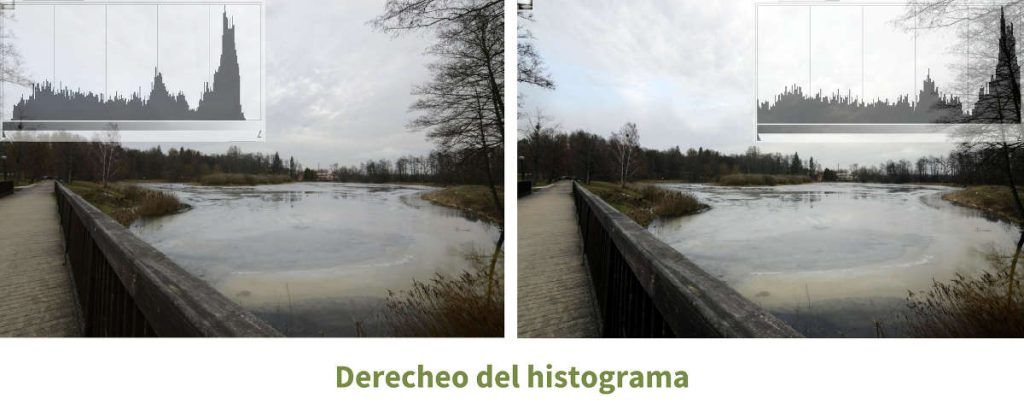
The "comb effect" or posterization This refers to the loss of photo quality when working with a source JPG file. The effect can be seen with the naked eye in the histogram of the image we're working with:
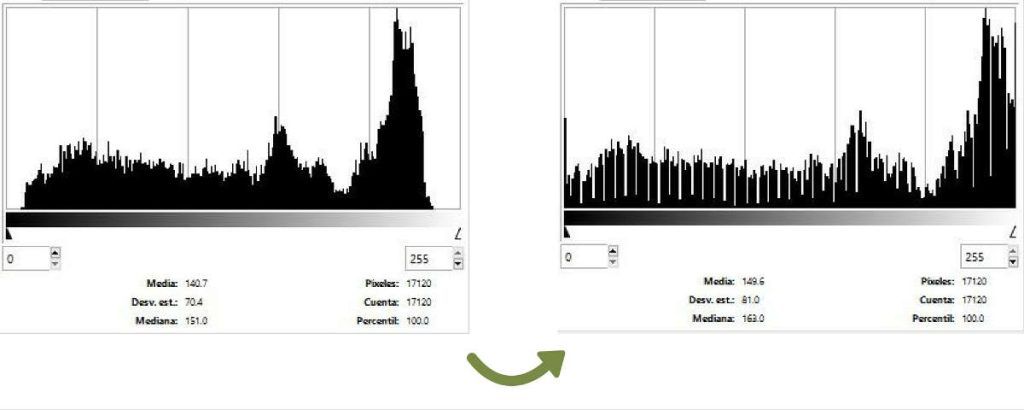 The first histogram is of the photograph, taken in RAW format, as it came from our memory card. The second histogram is of the same photograph, taken in JPG and subsequently developed with GIMP. During development, we tried to adjust the levels and highlights, but the original file didn't have enough information to fill in the brightness levels generated during development, so steps those tones.
We've also mentioned that in RAW, we capture information at 12 or 14 bits, while in JPG, we compress information to 8 bits. It's always better to destroy information in development from 12 or 14 bits than from 8 bits.
 in a simple and less destructive way than if we work in JPG. We recently talked about the histogram shift to the right, but the RAW format also allows us to correct overexposed or burned images.
Shooting in JPG the preset values in the camera as the white balance They are automatically applied to the photograph. Changing these values during development will result in the loss of information, or in other words, quality.
On the other hand, a RAW file will allow us to modify the white balance without losing any information. Our camera's official software (Nikon or Canon, for example) will apply the default white balance values or preset settings such as contrast and saturation. But that software will also allow us to change these values without losing quality or information. A photograph can be ruined if the white balance isn't right, and creative white balance can turn a good photo into something truly stunning, so why risk shooting in JPG?
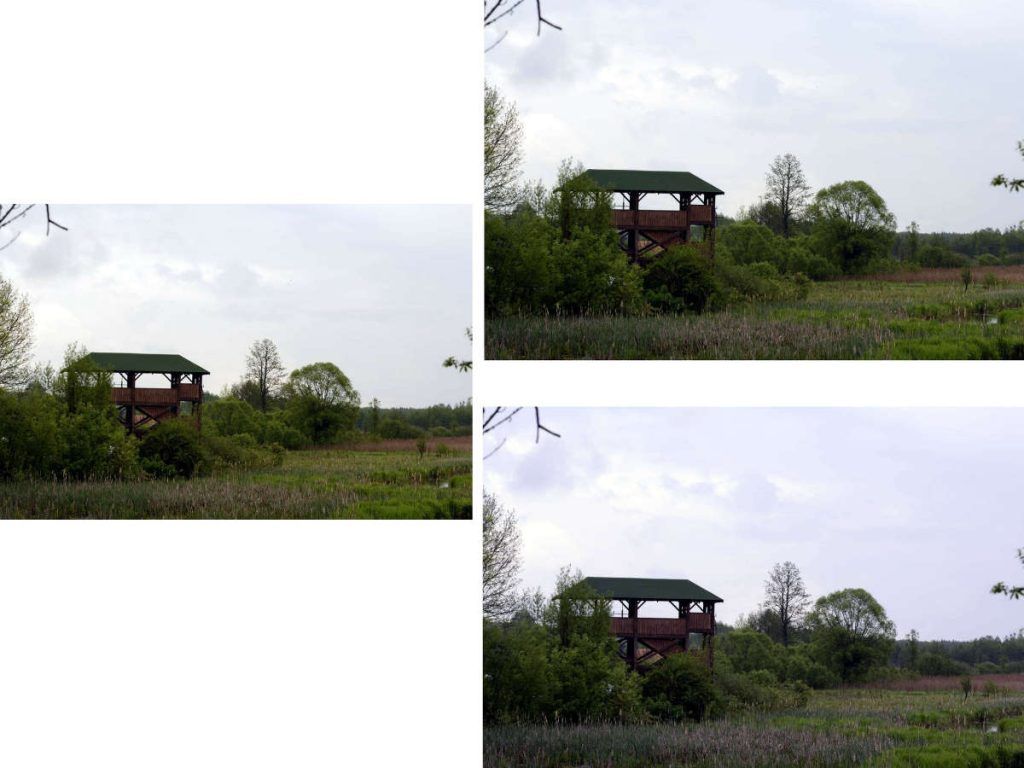
Of course, working in RAW allows us certain advantages, such as batch development. This way, after a photo shoot, we can apply development settings to the first image, copy them, and apply them to the rest of the photos in the batch. This way, all images from the same session will have the same white balance and the same saturation, brightness, and other level settings.
Shooting in RAW means we'll then have to develop and edit those photos on a computer and convert them to JPG so we can view them without specific photography software. When we know how to set the camera's parameters based on what we're going to photograph, developing them is simple: adjust levels (saturation, brightness, and contrast) and retouch highlights if we haven't nailed the histogram the first time. But there are people who don't want to spend time in front of the computer (and believe me, I'm one of them), so I understand that sometimes this digital development work can be a disadvantage.
JPG files take up much less space. Space isn't an issue these days, unless we want to take photos and send or upload them instantly. JPG is the standard working format for sports journalists, for example, since they have to send their photos almost instantly. It's also the best format when we want to update our social media immediately.
JPG files can be opened with any imaging software and printed without development or processing. RAW files, on the other hand, require specific photography software.
In this case, I'll let you draw your own conclusions. The choice between shooting in RAW or JPG may be simple for some people. Of course, if we want as much information as possible about the scene, the decision is clear, but if we don't have software capable of interpreting and reading RAW and converting it to JPG, we won't be able to enjoy our photos.
I think it is more important to emphasize something that few people think about: the importance of know how to "reveal" digitally RAW files. It's no use shooting in RAW and using the right program if you don't know how to interpret the histogram or adjust the levels of your image. That's why it's always advisable to learn something about development and post-processing in addition to learning how to photograph. And this is coming from someone who doesn't like retouching their images. I'm not exactly a proficient developer either, and I prefer to adjust as little as possible using Nikon's own software rather than delving into a whole host of retouching tasks that completely change the original photo.
For those undecided? Modern cameras always give us the option of shooting in RAW + JPG, generating two files of the same image. This way, we'll have all the advantages of RAW and the ability to instantly upload our JPGs to social media. The downside: two files of the same photo taking up space for the price of one 😉
Greetings friends and see you next article.